Welcome To "All-Top-Tricks"

All-Top-Tricks Here You Can Get Free Tutorials On Blogger Tips And Tricks, All Computer Tricks, Search Engine Optimization, Guide Line For Beginners, Blogger Top And Latest Widget , Facebook Tips And Tricks Etc..

Showing posts with label Blogger Tips. Show all posts

Saturday, March 29, 2014

Top 5 Free-speed Analyzers for you blog

Unknown | 3:50 PM | | Be the first to comment!

Top 5 Free-speed Analyzers for you blog
When we recently installed our blog on WordPress, the default themes and the system is optimized as we want and we will do a great job to improve site performance, especially taking into account the type of hosting that we use, number of plugins that we have installed site template, etc..

After creating the blog with our theme, plugins, etc., we must analyze the load times and how this optimized our site. We can do speed tests on different free online services, keep records and then proceed to optimize our blog.

To measure results, we can use these free services analyzers and speed comparisons, once optimized the blog can again perform the tests and view the results. Among the free services available are: GTMetrix, Pingdom, the famous Speed ??Service Google Insights, Page Speed ??Tool Ninjas and service iwebtool

My recommendation is to use "WordPress Super Cache + CloudFlare" and achieve good results, can also create Gzip compression and further improve load times.

Hey EveryOne! I BILAL AHMED,From Pakistan,Author of this blog.. By Profession I'm a Web Designer,Blogger and SEO Optimizer. I'm not having an educational degree or something like that but, I'm the one who has done everything whatever i want to do.Thanks for visiting this blog.if you like it than please share this one with others.
We used Various sources to obtain data and information For this Website to make it more useful and better for our viewers.We asurw that the contents of this website are not based on personal knowledge of any other. If you have any question you can contact us or meet with us.Thanks 


Wednesday, March 26, 2014

The 10 Most Wanted Tips for Blogger

Unknown | 6:26 PM | Be the first to comment!
The 10 Most Wanted Tips for Blogger


This purports to be a list of 10 most wanted Blogger tricks, some very simple, some not so, but all looking to improve some aspect of the blogging platform of Google.

The 10 Most Wanted Tips for Blogger


1. Remove the Blogger navbar or toolbar.

Although this bar may have some shortcuts to manage our blog, its value is little or no cost to the reader, occupies little extra space and aesthetics. Its elimination is very simple, you just have to go to Design / Edit HTML and find this code:

]]> </ b: skin>

And just before pasting the following:

# navbar-iframe {height: 0px; display: none, visibility: hidden;}

2. Show most recent comments and recent articles in the sidebar.

This "trick" is based on using the syndication management reviews and articles all have Blogger blogs. They are:

For comments: http://makemoneyfreewithus.blogspot.com/feeds/comments/default
For articles http://makemoneyfreewithus.blogspot.com/feeds/posts/default

makemoneyfreewithus.blogspot.com Where is the address of your blog.

Now you just have to go to Design / Page Elements and click on Add a gadget in the window that opens a Feed gadget is selected and address written comments to show the latest remarks, the process is repeated to create feed a new gadget but this time using the direction of the items.

3 . Add a side or additional bar to the sidebar template .

It seems to be increasingly inadequate one sidebar, add the extra complexity of a design done will vary according to the type of design and knowledge that have HTML and CSS.

4 . " Read More " or " Continue reading " Articles Blogger .

To make the navigation light our readers many times should show only a summary of the items. As Blogger does not have this feature by default, will have to use CSS or Javascript for this purpose.

Blogger tips and tricks explains how to do it and readlyblogger shows an "elegant " way to reach the same.

5 . View the most popular or most commented articles .

When an article has many comments , this speaks to its possible value to visitors . This is not a feature of Blogger so we must resort to a new script. In makemoneyfreewithus.blogspot.com shows how to create a gadget to show the most popular entries in its showcase we makes a good fit for this trick to world wide .

6. Pagination or Blogger pages numbered.

Blogger only shows a link to the next or previous page with the page to display a larger number of pages to navigate indicated with numbers. Again the operation is based on a script that needs to be installed on the blog to work.

7. Add a favicon in Blogger.

To add that little visible in bookmarks, tabs and address bar icon, you just have to create an icon and link from the template. To this from Design / HTML Edition is looking for the following code:

<title> <data:blog.pageTitle/> </ title>

And just before the following places:

<link href="http://xyz.com/favicon.ico" rel="shortcut icon" type="image/x-icon"/>
<link href="http://xyz.com/favicon.ico" rel="icon" type="image/x-icon"/>

Http://xyz.com/favicon.ico Where is the URL of your favicon.

To get the URL of your favicon you can host it on a free service like Fileden.

8. Use your own domain on Blogger .

Having your own domain is the first things you should consider when we want to take more seriously our blog . The advantages are many and very small fee . Blogger allows the use of domains on your own platform.

9. Feedback form at the entrance .

This actually ceased to be a trick , as is already bearing of the common features of Blogger, still must be activated from Settings / comments , then on the option " Comment Form Placement " " Embedded to Input is selected then " .

In some cases it may be necessary to implement this feature manually.

10. Putting Adsense Ads in Blogger .

There are several options to put Google Adsense, so you can choose between the 10 Places to put Adsense in Blogger .

As always , the recommendation is to use only the tricks that are essential to our blog to keep from overloading the site content and / or make it too heavy.

Hey EveryOne! I BILAL AHMED,From Pakistan,Author of this blog.. By Profession I'm a Web Designer,Blogger and SEO Optimizer. I'm not having an educational degree or something like that but, I'm the one who has done everything whatever i want to do.Thanks for visiting this blog.if you like it than please share this one with others.
We used Various sources to obtain data and information For this Website to make it more useful and better for our viewers.We asurw that the contents of this website are not based on personal knowledge of any other. If you have any question you can contact us or meet with us.Thanks


Saturday, March 22, 2014

Blogging Tips - Last 5 Tips to Succeed Online blogs

Unknown | 8:31 PM | Be the first to comment!

Blogging Tips - Last 5 Tips to Succeed Online blogs
Absolutely anyone can create their own blog online. Blogging is a great way to share your views and opinions with the world . The beauty of a blog instead of a website is that it requires no programming knowledge to configure it. Creating a blog is a much simpler and can be accomplished in a short time with sites like Wordpress or Blogger process. There are some tips for blogs that pays to consider before setting up your own blog.

Here are 5 Tips for blogs that will help your blog attract online attention :


1. Write about a topic that is well informed. 
It makes no sense to create a blog on a topic that has no interest in just because you think you will rank well in search engines. Even if you manage to find a keyword that has low competition , if you are not interested in the subject, which will not be long before you give up the idea. Make sure you start writing about something you love . If you do not know much about it , wrapped himself in research and become an expert as soon as possible .

2 . Update your blog regularly. 
The more often you can update your blog , the better. The important point to keep in mind is consistency. It is better to be consistent with your blog instead of the updated 5 times a week and then again three weeks later. You would be better , updated once a week , every week regularly. Search engines favor consisting of blog posts that opposed the irregular publication.

3 . Create backlinks through social networking sites .
 Build backlinks to your blog is an important factor in achieving high search engine rankings look. The more backlinks you have to your blog , the faster they move in the rankings for SEO purposes . It is best to start with sites like Facebook and HubPages to start creating backlinks to your site. Search engines are continually dragging these sites for new content .

4 . Ping your blog after each post . 
A ping is used to notify the search engines that new content is posted to your blog. It works similar to submitting your website to search engines so . Sites like Pingomatic Pingler allow you to present and publish your blog every time you provide fresh content on your blog , improving your SEO positioning.

5. Post tweet on Twitter for every new post you make. 
If you have not signed up for Twitter , however , I'd suggest you definitely look into it . By building a list of followers on Twitter , you can fully leverage your blog by updating his Twitter account every time you make a new post . There is a specific plugin can be found for that Tweet Wordpress blog post automatically.

Hey EveryOne! I BILAL AHMED,From Pakistan,Author of this blog.. By Profession I'm a Web Designer,Blogger and SEO Optimizer. I'm not having an educational degree or something like that but, I'm the one who has done everything whatever i want to do.Thanks for visiting this blog.if you like it than please share this one with others.
Our site always trying to share something new and also useful Mobile Tips and Tricks, If you find and new latest updated working code than please comment below we will sure updated, Thanks for visit our blog, For more method an useful stuffs keep explore our blog, For support us like our Facebook page and share this article with your friends.

 We used Various sources to obtain data and information For this Website to make it more useful and better for our viewers.We asurw that the contents of this website are not based on personal knowledge of any other. If you have any question you can contact us or meet with us.Thanks 


Thursday, March 20, 2014

Blogger Tips-Simple Steps To Add Blog on Google Analytics

Unknown | 7:49 PM | Be the first to comment!
If you have a blog on Blogger, blogger stats page views offer having your blog. These include visits by search engine robots to crawl your site. In most cases, these statistics provide data that do not correspond with reality. You can have 100 pages vistas a day and that 80% of the pages are due to visit the pages that when robots crawl your site for content. If you are a blogger and want to really know how many visits you have, which pages are most viewed, among other interesting data, we recommend that you sign in with your Google Analytic, generate the tracking code and put in the source code of your blog on Blogger. ( This post Dedicated to Mudaser Bhukhari from Ali Pur) Dear Pakistanis

How to Add Google Analytics to Blogger


1 Create a Gmail account.

Blogger Tips-Simple Steps To Add Blog on Google Analytics

2 Go to the Google Analytics website 

Blogger Tips-Simple Steps To Add Blog on Google Analytics

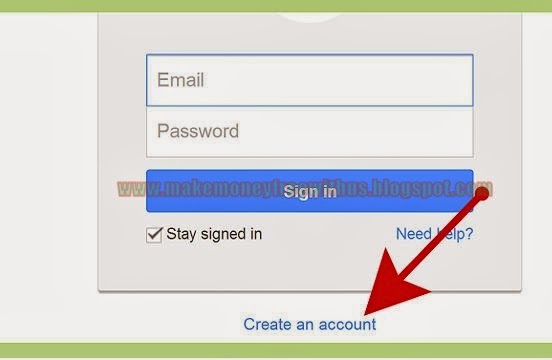
3 Sign in with your Gmail account.


4 Click Sign Up.


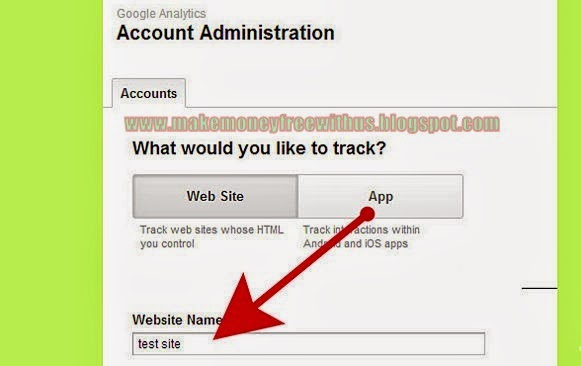
5 Name your website to help differentiate it from your other tracked sites.


6 Copy and paste your web site URL. For example, www.yourwebsite.com or yourblog.blogspt.com 


7 Fill out the rest of the information required and click continue.


8 Copy the tracking code displayed in the large box.


9 Sign in to your Blogger.


10 Click on the 'Template Tab,' then click on 'Edit HTML' 


11 Click on 'Download Full Template' to back up your template onto your computer. (It's always a good idea to back up your template before you make any changes) 


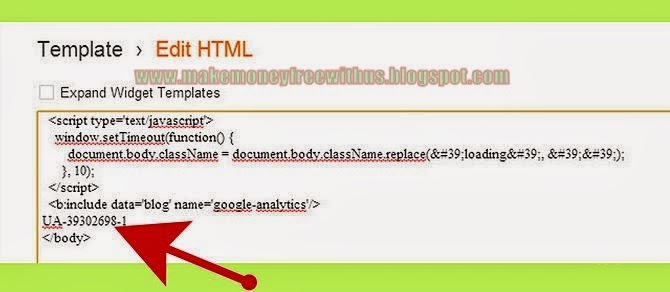
12 Scroll down to the bottom and paste the tracking code just before the closing </body> tag.


13 Click 'Save Template' to save the changes.


14 Refresh your Google Analytics page. The status should say 'Tracking Installed.' 


15 Wait 24 hours to see the tracking results.

We hope this post has been useful to you and hope your comments, suggestions, questions both on our blog and through social networks.

Hey EveryOne! I BILAL AHMED,From Pakistan,Author of this blog.. By Profession I'm a Web Designer,Blogger and SEO Optimizer. I'm not having an educational degree or something like that but, I'm the one who has done everything whatever i want to do.Thanks for visiting this blog.if you like it than please share this one with others.
We used Various sources to obtain data and information For this Website to make it more useful and better for our viewers.We asurw that the contents of this website are not based on personal knowledge of any other. If you have any question you can contact us or meet with us.Thanks 


Wednesday, March 19, 2014

Latest 12 Tips to Create a New Blog in 2014

Unknown | 8:01 PM | Be the first to comment!
Latest 12 Tips to Create a New Blog in 2014
The year ends with him a lot invested in 2013 projects efforts begin to take shape memory crystals and new ideas and dreams in project format begin to haunt the minds of many bloggers, Webmasters and people in general.

My question is, How was your pages to them during 2013? I know of cases of people who have experienced a growth creepy in less than a year and others that there is still much more to achieve them but have long term very, very large growth potential.

Tips when creating your next blog in 2014


A good idea I quite the head is the creation of more and new pages to implement much of the knowledge acquired during 2013. Think about it, for many of us to be in training and community such as Quondos assumed that our knowledge base index, contacts and collaborations fires. If this is your case, here are some tips to implement for your next web project and promising.

  1. Domains With branding. I would of course depending on two types of situations disntintas. If you are creating a blog to reinforce your brand and / or enhance your professional presence the best alternative is to use your own name or brand. If you go to create projects to position and exploit the medium / short term exact match domain is still the best option.
  2. How to hire my new hosting company. Depends on what you search. Value for money + support in Spanish: OVH. Fast and quality Hostings: Host Hostgator or Banana. All these hosting also are prepared to host PHP applications.
  3. Theme: monetization or learning. A frequent question. I recommend you just write what you like until your project will generate enough money to pay writers to write on those more oriented to monetizing blogs you'd get in but do not like to write.
  4. A free or paid theme. At this point there are reviews of all types. Many will tell you that a professional presence to need a payment item, which in most cases may be true, but there are a lot of subjects free of proven quality enough.
  5. Topic Responsive from scratch or retrofitting. My advice is that if you can always use responsive themes (adapted to mobile devices) from the beginning. The subsequent use of plugins that make your topic can generate responsive doubled in the worst content.
  6. Do I use Adsense from the beginning? I would expect at least a few months. During the first half-decent will not generate any income and should not show Google that from 1 minute our primary objective is to monetize.
  7. Do I use the maximum number of blocks allowed by Adsense? One of the things I quickly discovered last year that 2013 was not put more advertising always were earning more aggressively . Besides having much published at the top of the interface can be counterproductive or even penalized ( they say ) .
  8. + Adsense Afliated too. Not if used with head. Wait a few months to insert Adsense and a few more until your site is to introduce consolidated affiliate links. This combination is proven as one of the most powerful when it comes to monetizing a blog.
  9. Do I need to be autonomous to sell from my blog? In strictly legal terms 100 % yes . But in practical and real terms do not need to do it until your level of turnover is significant, it would make logical sense and it would be impossible to maintain.
  10. Use pages Ten- Euros to find cheap freelance. Often when we start a new project small tasks become titanic tasks. I found and solved several of my problems in such pages and make you save time and money.
  11. Any general or thematic microniches? If you can always microniches. It is preferable to less searched topics but with less competition and position yourself as an expert in that parcel. Subsequently be your little piece of the internet pie.
  12. Reinvest your earnings, the formula "business-blogger." One of the guidelines that will make you different. Do not waste your first income reinviertelos on new content, themes Web design and training in your own niche. Over time this practice will make a difference.

These are my 12 tips for your next blog in 2014. Nothing from here, except to wish you a happy new year and lots of energy (not luck, luck working) for the coming year and your Web projects. See you next year. Better, more and better

Hey EveryOne! I BILAL AHMED,From Pakistan,Author of this blog.. By Profession I'm a Web Designer,Blogger and SEO Optimizer. I'm not having an educational degree or something like that but, I'm the one who has done everything whatever i want to do.Thanks for visiting this blog.if you like it than please share this one with others.
Our site always trying to share something new and also useful Mobile Tips and Tricks, If you find and new latest updated working code than please comment below we will sure updated, Thanks for visit our blog, For more method an useful stuffs keep explore our blog, For support us like our Facebook page and share this article with your friends.

 We used Various sources to obtain data and information For this Website to make it more useful and better for our viewers.We asurw that the contents of this website are not based on personal knowledge of any other. If you have any question you can contact us or meet with us.Thanks 


Monday, March 17, 2014

How to Create a Good Logo for Your Blog?

Unknown | 8:53 AM | Be the first to comment!

How to Create a Good Logo for Your Blog

Did you just create your blog and you are thinking of creating a good logo for this? Below I will share some small tips and advice that will help you secure. But what is a logo or logo? For me without resorting to definitions book, a logo is the graphic representation of a brand so that it is iconically recognizable to your audience.

What requirements must have a good logo?

To create a logo for our blog to be unique, original, creative and most importantly that is representative of your blog, you must be patient and thorough, since it is a delicate and key process in many ways. So I leave these guidelines of conduct to create a logo that meets your needs as a blogger.

Your logo should be attractive: It seems obvious, but not always the effect of persuasion or attraction you want is achieved, so give returns to the central idea and focus as to make it attractive to the eye and the mind. For the public to remember your logo it must have struck first.

Your logo should "work" in black and white: You can create designs and assemblies thousand images to use as logo, but if that is not well in black and white icon is not enough as we wish. Overloading our plays against us, especially in this aspect designs.

Your logo should be recognizable and identifying your blog: Clearly, your logo should be the image of your blog, but you must have a relationship and a direct line with it, to be associated almost unconsciously and get well, to be recognizable to our customers. This part is really important, because here you must capture the essence of your blog and create a design to represent it deserves.

Steps to create the logo for your blog

Initial Brainstorming: I recommend you start writing on paper all the words, emotions or ideas that have to do with your blog, symbols or pictures that you would like to enter, colors, textures ... For all that creates a list and let stand a few days and read it out again and rewrite, that help you know what ideas are good and which are discarded, this process will make you go creating your own idea about the logo you want.

Scans and retouch your logo: Once we have created the sketches on paper, had to be scanned. That can be done in different ways, but I recommend scanning or working with a graphics tablet and spend the sketches directly to our PC to keep working on them. To convert from sketch to vector, we use programs that work with vectors, such as Adobe Photoshop or Illustrator, among many other programs. As is brooding and tweaks until a couple or three ideas that can be the ultimate.

Testing, testing: You have to try different fonts and colors, to find the most suitable for your blog. Make an impact, be consistent with your brand and colors that define it as it is, our objectives and the best way is to try and try, until you find the good. The key is to discover mistakes and successes, change to hit the mark.

Compare options and choose the final: Once we have the final proposals, we must take stock and choose which design best represents our blog, your attitude, your record, your style ... In short, choose one logo that meets your needs and those of your clients. Although I recommend you always keep in "beta" mode can always tweak things depending on the demands of the public or the feedback received, the important thing is to get something like (Minimum Viable Product).

Attach your logo to different media: Once we have our logo designed and created, we must adapt their characteristics depending on the substrate where it will be exposed. For example, in Google+ you need a different action on Twitter or Facebook, so I recommend that you consider this matter and you make sure you are implementing your logo or image in the best way for each bracket.

Power for a slogan to your logo: It is worth having a motto or slogan as a blog or brand, so think and design your battle cry, will give extra strength to your logo.

I hope these simple and easy guidelines to help you have a little more clear about the process of creating a logo for your blog, but keep in mind that you should follow your own instinct and how to develop your logo. As a good friend says: "Every logo has a different design process", he is dedicated to this post.

Hey EveryOne! I BILAL AHMED,From Pakistan,Author of this blog.. By Profession I'm a Web Designer,Blogger and SEO Optimizer. I'm not having an educational degree or something like that but, I'm the one who has done everything whatever i want to do.Thanks for visiting this blog.if you like it than please share this one with others.
Our site always trying to share something new and also useful Mobile Tips and Tricks, If you find and new latest updated working code than please comment below we will sure updated, Thanks for visit our blog, For more method an useful stuffs keep explore our blog, For support us like our Facebook page and share this article with your friends.

 We used Various sources to obtain data and information For this Website to make it more useful and better for our viewers.We asurw that the contents of this website are not based on personal knowledge of any other. If you have any question you can contact us or meet with us.Thanks 

Saturday, March 8, 2014

Where is Blog Visitors Pleasure and Revisit

Unknown | 2:50 PM | Be the first to comment!

Where is Blog Visitors Pleasure and Revisit
When you create a blog you need a best guilty thinking for getting visitors on your blogs again and again. When you create a blog so make with user friendly design is very needy for making it successful. But that is not the only thing a blogger should be concerned about. A blogger who understands his visitors, I mean readers, and who satisfies them, will always find success. But what�s happening today? Many bloggers are unable to accomplish their per-set goals and therefore giving up their blogging career. Where do you think the mistake lies? Let�s find out.

What u Want to Visitors or Readers?

Many bloggers live in a misconception that getting more traffic makes them rank high and earn more money. Certainly, the more traffic you get the more revenue you can generate. But when you depend upon fresh and anonymous traffic every day, you�ll surely find a black day when all your traffic almost disappears.

I�m serious, even Darren Rowse had a day when he almost lost his business long back in 2004. He then realized not to place all his eggs in one basket i.e. depending completely on Google for traffic and revenue.

So, what should you look for? Both are important for a blogger to earn and rank his blog.

�A visitor is a temporary reader and a reader is a permanent visitor�

Both can benefit you and help you raise your income. But that�s not what we should consider now, one should be more concerned about �giving more to them.�

Relationship Management
Just like CRM, you should be more concerned about maintaining a long term relationship with your visitors. That�s what builds your readership. Treat your visitors as customers and try to respect them and make them your loyal readers. But the strategies to be applied will be entirely different here, because you will not have a direct contact with them. So, how can you implement it?

Tips for beginners:
Since you�ll have very less or almost zero traffic in the very beginning, it�s a little tough task for you to build readership. Hey! It�s not that difficult if you really capable. You shouldn�t just concentrate on writing for robots (search engines). I agree that it�s really hard to drive traffic to your blog via search engines. So, it�s better to drive them from other blogs. Confused?

You�ve not started a blog just for someone who is new to web. People who need your content were already active on the web somewhere in social sites or other blogs. Now your duty is to just make them know that you have the content that they�re looking for.

Tips For Bloggers
Attracting visitors is easier than retaining them. You might be having anywhere between 1K to 100K readers i.e. followers and visitors. Have you ever worried about them? If not, it is the time to act to benefit them and get benefited from them.

  •     Don�t post what you know, give them what they need
  •     Don�t go straight into the topic & don�t end it the same way
  •     Let them know that you have all what they are looking for
  •     Show your visitors that you�re really caring them
  •     It�s better to offer them incentives through giveaways

People want something especially prepared for them; all you have to do is, use direct speech. This makes them feel that you�re talking to them directly. Also, ask them some questions related to the post they are reading.

What happens when you ask a question? They come up with an answer and interact through comments to your post. By doing this you can�t expect everyone to comment, but at least you�ll see a spike in comments.

There is nothing great than story telling when you want to express something. That even works for bloggers. I don�t mean that you should always tell stories; include some real life examples in your posts. If your post is theory, the example you mentioned will be a proof to it.

For you, it is a Blog and for your readers it should be a �Brand�. What is the difference? If you create a brand image for your blog in their minds, they�ll trust you. You know what; such readers even help your blog to reach their friends by sharing on social media.

Whether it is referral, direct or search traffic, a visitor lands on your web pages to find a solution to his/her problem. If your posts just solve such issues, he may not look back at you again.

As said in the above tips, just notify him that he has more content on your blog that boosts his cognizance. Let me give an example to you.

If your post is Tips to Increase Facebook Fan Page Likes you can include a related post like �3 Creepy Myths about �Buying� Facebook Likes Nobody Wants to Tell You�. Yes, you�re right it�s ON Page SEO and you should never forget it.


Hey EveryOne! I BILAL AHMED,From Pakistan,Author of this blog.. By Profession I'm a Web Designer,Blogger and SEO Optimizer. I'm not having an educational degree or something like that but, I'm the one who has done everything whatever i want to do.Thanks for visiting this blog.if you like it than please share this one with others.
Our site always trying to share something new and also useful Mobile Tips and Tricks, If you find and new latest updated working code than please comment below we will sure updated, Thanks for visit our blog, For more method an useful stuffs keep explore our blog, For support us like our Facebook page and share this article with your friends.

 We used Various sources to obtain data and information For this Website to make it more useful and better for our viewers.We asurw that the contents of this website are not based on personal knowledge of any other. If you have any question you can contact us or meet with us.Thanks 


Contact


  1. Are you think that is this post is useful for you ???? if yes or not,than kindly tell us about your opinion in comment.
  2. If you have any problem than tell us,we will give you a proper solution of your problem.


Ranking and DMCA

Like our Page

Copyright © . ALL TOP TRICKS. All Rights Reserved.
Blog Owner :- Gujjar_Awan | Proundly Designed by :- Admin