Welcome To "All-Top-Tricks"

All-Top-Tricks Here You Can Get Free Tutorials On Blogger Tips And Tricks, All Computer Tricks, Search Engine Optimization, Guide Line For Beginners, Blogger Top And Latest Widget , Facebook Tips And Tricks Etc..

Showing posts with label Facebook. Show all posts

Wednesday, March 19, 2014

Facebook and Competitions

Unknown | 10:02 PM | Be the first to comment!
Facebook and Competitions


Do not surprise anyone if I say that what most people tend to like things are free , we are well and nothing can stop it. How can we take advantage of it being community managers ? The answer is simple and one word: Contests .

Among the many tools and social networks that can use CMs , there is one that lends itself well to host contests , Facebook . A priori one can think to do contests on Facebook is easy. Who has not seen the typical contests business pages are to achieve the maximum number of " likes "?
The problem of competitions on Facebook

However, something that not many people know is that following the policy of Facebook promotions , contests can not be made in the wall of a page . Not to get "Like" , or upload photos, and get comments ... Following strictly this policy, all contests and promotions must be hosted on third party applications. Once there are housed should encourage participation in the application itself or in a separate tab for that promotion on our site .

Once we create this application , we can do photo competitions , videos , comments ... and encourage feedback , but always within the application .

Another thing that not many people know is that you can not communicate to the winners on the wall , or contact them via Facebook private message . It requires asking participants the email or mailing address in the registration process of the application and contact them those two ways.

Moreover our promotions should always be aimed at people over 18 and not give prizes as : alcohol, snuff , petrol , games, and more bizarre as firearms , prescription drugs ...

Gradually pages of major companies and large these standards are accepted and are going all Facebook applications , but what about small business pages that do not have money or staff who can design an application or know ? It is one of the many questions that arise from this, no easy answer.

What do you think these rules ? Do some knowledge ?

Hey EveryOne! I BILAL AHMED,From Pakistan,Author of this blog.. By Profession I'm a Web Designer,Blogger and SEO Optimizer. I'm not having an educational degree or something like that but, I'm the one who has done everything whatever i want to do.Thanks for visiting this blog.if you like it than please share this one with others.
Our site always trying to share something new and also useful Mobile Tips and Tricks, If you find and new latest updated working code than please comment below we will sure updated, Thanks for visit our blog, For more method an useful stuffs keep explore our blog, For support us like our Facebook page and share this article with your friends.

 We used Various sources to obtain data and information For this Website to make it more useful and better for our viewers.We asurw that the contents of this website are not based on personal knowledge of any other. If you have any question you can contact us or meet with us.Thanks 


Saturday, March 8, 2014

Facebook Messenger heads for Windows Phone

Unknown | 6:40 PM | | Be the first to comment!

Facebook Messenger heads for Windows Phone
Facebook Messenger app will be delivered with a completely new user interface unique to Windows Phone.

Microsoft revealed at a press event ahead of Mobile World Congress that Facebook Messenger will be arriving on Windows Phone in the next few weeks.

Microsoft Vice President and Manager for Windows Phone, Joe Belfiore, was speaking at a press event in Barcelona ahead of Mobile World Congress when he confirmed its arrival.

�We�ve been working with Facebook testing out their implementation for a while,� Belfiore said. �It�s looking good and we will have it for our customers soon.�

The Facebook Messenger app will be delivered with a completely new user interface that�s unique to Windows Phone.

It will be separate from the main Facebook app and will work independently.

Last year, Windows Phone vendors shipped 33.4 million devices globally, giving the operating system a market share of 3.3 percent.

That's up from Windows Phone's share of 2.4 percent in 2012, and marks a near doubling of the growth rate for the overall smartphone market.

Although Windows Phone is looking to further expand its app market as still sits behind iPhone and Android phone sales.

�There�s a number of more great apps coming soon,� Belfiore added. �Stay tuned as you hear about more compelling demanded user apps coming for Windows Phone.�

There are now some 200,000+ apps on the Windows Phone store, according to Belfiore, with app downloads totalling 4 billion.


Hey EveryOne! I BILAL AHMED,From Pakistan,Author of this blog.. By Profession I'm a Web Designer,Blogger and SEO Optimizer. I'm not having an educational degree or something like that but, I'm the one who has done everything whatever i want to do.Thanks for visiting this blog.if you like it than please share this one with others.
Our site always trying to share something new and also useful Mobile Tips and Tricks, If you find and new latest updated working code than please comment below we will sure updated, Thanks for visit our blog, For more method an useful stuffs keep explore our blog, For support us like our Facebook page and share this article with your friends.

 We used Various sources to obtain data and information For this Website to make it more useful and better for our viewers.We asurw that the contents of this website are not based on personal knowledge of any other. If you have any question you can contact us or meet with us.Thanks


Thursday, November 14, 2013

Add Cute Custom Facebook Like Box To Blogger

Unknown | 7:30 PM | | Be the first to comment!
How To Add a Custom Facebook Like Box to Your Site
Facebook Like Box is very useful widget to show visitors the authority and love of the people for his blog. Facebook offers a simple Like Box plugin that you can easily integrate into your website But the default Facebook like box is not having good look at ugly all. This tutorial will show you How To Add Cute Custom Facebook Like Box using CSS To Blogger. Facebook Like Box is the best way to get more fans on Facebook. A Fan Box allows great attract your Blog more visitors or readers to like your Facebook fan page not leaving the like go here. you don't need to do any think you only need to copy and paste the code. Im Sure that this Cool Customize Facebook Like Box With CSS widget attracts your facebook fans increase the count of Likes.


How To Add a Custom Facebook Like Box to Your Site


Now let's start adding it...

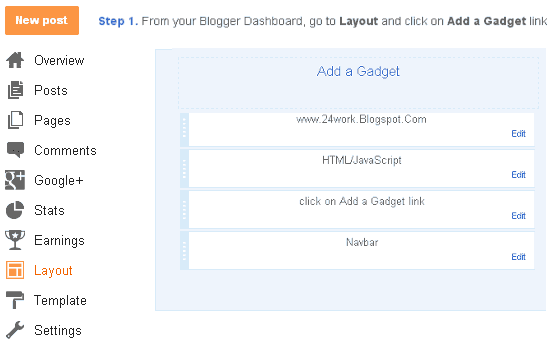
Step 1. Login to Your Blogger Account.Go to your Blogger Dashboard.Click on Layout tab from left pane and click on Add a Gadget link.


Blogger Tips And Tricks|Latest Tips For Bloggers

Step 2. After click on Add a Gadget link A pop-up box will open now
with many gadget list, Choose HTML/JavaScript from the gadget options by clicking the blue plus sign for that gadget.


Blogger Tips And Tricks|Latest Tips For Bloggers

Step 3. Select 'HTML/Javascript' and add the one of code given below.

Step 4. Now Click On Save 'JavaScript' You are done.

Note:- Replace pages%2FBlogspot-tutorial%2F220888831260608 With your Facebook User name


Style 1:-


Customize Facebook Like Box


<div style="background: url('https://blogger.googleusercontent.com/img/b/R29vZ2xl/AVvXsEj99QAlSaWxsBcujivPGJ-WYI7t00Wk3NTao5gzBX4nHgsA6qmYDImdSXsovF4gXgKPj_igHiGKkGCSk67mIN5vQnJSD36NnGG23C7ixcW1lxkIBalJGMMTgTNSkOc0Z_DVTDJiux2GRVcY/s1600/fan-01-pic.png');overflow:hidden;border-radius: 110px;.height:250px;width: 238px;border-radius: 0px 13px 0px 0px;overflow: hidden;"><div style="height: 250px; overflow: hidden;"><a href="http://yoursdownloading.blogspot.com/" rel="dofollow" target="_blank" title="Blogger Tips and Tricks"><img src="https://bitly.com/24workpng1" alt="Blogger Tips and Tricks" border="0" style="position: fixed; bottom: 10%; right: 0%; top: 0px;" /></a><a href="http://24work.blogspot.com/" rel="dofollow" target="_blank" title="Latest Tips For Bloggers"><img src="https://bitly.com/24workpng1" alt="Latest Tips For Bloggers" border="0" style="position: fixed; bottom: 10%; right: 0%;" /></a><a href="http://yoursdownloading.blogspot.com/" rel="dofollow" target="_blank" title="Blogger Tricks"><img src="https://bitly.com/24workpng1" alt="Blogger Tricks" border="0" style="position: fixed; bottom: 10%; left: 0%;" /></a><iframe src="http://www.facebook.com/plugins/likebox.php?href=http%3A%2F%2Fwww.facebook.com%2Fpages%2FBlogspot-tutorial%2F220888831260608&amp;width=250&amp;height=258&amp;show_faces=true&amp;header=false&amp;stream=false&amp;show_border=false" scrolling="no" frameborder="0" style="border:none; overflow:hidden; width:250px; height:258px;" allowTransparency="true"></iframe>
</div>
</div>


And now click Save


Style 2:-


Customize Facebook Like Box


<div style="background: url('https://blogger.googleusercontent.com/img/b/R29vZ2xl/AVvXsEia6MXnLpEBV0sTrDc5T9ocTTV6qarSFVPoms5pFriKxpTGAgLFsd8Cnn2YYnc_iSkbvGFA5zfRF7VErl-0bsIEwh67Zx7CfYWvhcN-GNztLpmHTyn1NrzrUI392xcozy6BAZUrKq6C9wbs/s1600/fan-02-pic.png');overflow:hidden;border-radius: 110px;.height:250px;width: 238px;border-radius: 0px 13px 0px 0px;overflow: hidden;"><div style="height: 250px; overflow: hidden;"><a href="http://yoursdownloading.blogspot.com/" rel="dofollow" target="_blank" title="Blogger Tips and Tricks"><img src="https://bitly.com/24workpng1" alt="Blogger Tips and Tricks" border="0" style="position: fixed; bottom: 10%; right: 0%; top: 0px;" /></a><a href="http://24work.blogspot.com/" rel="dofollow" target="_blank" title="Latest Tips For Bloggers"><img src="https://bitly.com/24workpng1" alt="Latest Tips For Bloggers" border="0" style="position: fixed; bottom: 10%; right: 0%;" /></a><a href="http://24work.blogspot.com/" rel="dofollow" target="_blank" title="Blogger Tricks"><img src="https://bitly.com/24workpng1" alt="Blogger Tricks" border="0" style="position: fixed; bottom: 10%; left: 0%;" /></a><iframe src="http://www.facebook.com/plugins/likebox.php?href=http%3A%2F%2Fwww.facebook.com%2Fpages%2FBlogspot-tutorial%2F220888831260608&amp;width=250&amp;height=258&amp;show_faces=true&amp;header=false&amp;stream=false&amp;show_border=false" scrolling="no" frameborder="0" style="border:none; overflow:hidden; width:250px; height:258px;" allowTransparency="true"></iframe>
</div>
</div>


Style 3:-


Customize Facebook Like Box


<div style="background: url('https://blogger.googleusercontent.com/img/b/R29vZ2xl/AVvXsEiYlCnB46tM484-zQpRIlYIih8jHrIbq24ouDhyphenhyphenXplV0aKrWH2fpqKvwf7uIWrbay1aHkm7hHF0kv9HZiIJXTAQ6fHOYK_pQbnk-LrnqkEkFujfQQ_VFEgHewjEFjN0LExMfjUA74-ZCuTe/s1600/fan-03-pic.png');overflow:hidden;border-radius: 110px;.height:250px;width: 238px;border-radius: 0px 13px 0px 0px;overflow: hidden;"><div style="height: 250px; overflow: hidden;"><a href="http://yoursdownloading.blogspot.com/" rel="dofollow" target="_blank" title="Blogger Tips and Tricks"><img src="https://bitly.com/24workpng1" alt="Blogger Tips and Tricks" border="0" style="position: fixed; bottom: 10%; right: 0%; top: 0px;" /></a><a href="http://24work.blogspot.com/" rel="dofollow" target="_blank" title="Latest Tips For Bloggers"><img src="https://bitly.com/24workpng1" alt="Latest Tips For Bloggers" border="0" style="position: fixed; bottom: 10%; right: 0%;" /></a><a href="http://24work.blogspot.com/" rel="dofollow" target="_blank" title="Blogger Tricks"><img src="https://bitly.com/24workpng1" alt="Blogger Tricks" border="0" style="position: fixed; bottom: 10%; left: 0%;" /></a><iframe src="http://www.facebook.com/plugins/likebox.php?href=http%3A%2F%2Fwww.facebook.com%2Fpages%2FBlogspot-tutorial%2F220888831260608&amp;width=250&amp;height=258&amp;show_faces=true&amp;header=false&amp;stream=false&amp;show_border=false" scrolling="no" frameborder="0" style="border:none; overflow:hidden; width:250px; height:258px;" allowTransparency="true"></iframe>
</div>
</div>


Style 4:-


Customize Facebook Like Box


<div style="background: url('https://blogger.googleusercontent.com/img/b/R29vZ2xl/AVvXsEhtfRyGNnsyc0YS5J1yFLhOIoUbh-FPCJIA40doHlKGan3B45zP1Okz0NDk_u01_nynexBZMUpqu80bSmtYnISLVdgfXwXt0GlVXGOisBKSGeAROL18OXwM7t6llexg33tBhySpwyWPCpUb/s1600/fan-04-pic.png');overflow:hidden;border-radius: 110px;.height:250px;width: 238px;border-radius: 0px 13px 0px 0px;overflow: hidden;"><div style="height: 250px; overflow: hidden;"><a href="http://24work.blogspot.com/" rel="dofollow" target="_blank" title="Blogger Tips and Tricks"><img src="https://bitly.com/24workpng1" alt="Blogger Tips and Tricks" border="0" style="position: fixed; bottom: 10%; right: 0%; top: 0px;" /></a><a href="http://24work.blogspot.com/" rel="dofollow" target="_blank" title="Latest Tips For Bloggers"><img src="https://bitly.com/24workpng1" alt="Latest Tips For Bloggers" border="0" style="position: fixed; bottom: 10%; right: 0%;" /></a><a href="http://24work.blogspot.com/" rel="dofollow" target="_blank" title="Blogger Tricks"><img src="https://bitly.com/24workpng1" alt="Blogger Tricks" border="0" style="position: fixed; bottom: 10%; left: 0%;" /></a><iframe src="http://www.facebook.com/plugins/likebox.php?href=http%3A%2F%2Fwww.facebook.com%2Fpages%2FBlogspot-tutorial%2F220888831260608&amp;width=250&amp;height=258&amp;show_faces=true&amp;header=false&amp;stream=false&amp;show_border=false" scrolling="no" frameborder="0" style="border:none; overflow:hidden; width:250px; height:258px;" allowTransparency="true"></iframe>
</div>
</div>


Style 5:-


Customize Facebook Like Box


<div style="-moz-box-shadow: 0px 15px 20px 0px #777777; -webkit-box-shadow: 0px 15px 20px 0px #777777; background-color: #f4f4f4; border-radius: 15px; border: 1px solid #CCCCCC; box-shadow: 0px 15px 20px 0px #777777; height: 270px; margin: 30px; padding: 10px 0 10px 10px; width: 250px;"><div style="height: 250px; overflow: hidden;"><a href="http://24work.blogspot.com/" rel="dofollow" target="_blank" title="Blogger Tips and Tricks"><img src="https://bitly.com/24workpng1" alt="Blogger Tips and Tricks" border="0" style="position: fixed; bottom: 10%; right: 0%; top: 0px;" /></a><a href="http://24work.blogspot.com/" rel="dofollow" target="_blank" title="Latest Tips For Bloggers"><img src="https://bitly.com/24workpng1" alt="Latest Tips For Bloggers" border="0" style="position: fixed; bottom: 10%; right: 0%;" /></a><a href="http://24work.blogspot.com/" rel="dofollow" target="_blank" title="Blogger Tricks"><img src="https://bitly.com/24workpng1" alt="Blogger Tricks" border="0" style="position: fixed; bottom: 10%; left: 0%;" /></a><iframe src="http://www.facebook.com/plugins/likebox.php?href=http%3A%2F%2Fwww.facebook.com%2Fpages%2FBlogspot-tutorial%2F220888831260608&amp;width=250&amp;height=258&amp;show_faces=true&amp;header=false&amp;stream=false&amp;show_border=false" scrolling="no" frameborder="0" style="border:none; overflow:hidden; width:250px; height:258px;" allowTransparency="true"></iframe>
</div>
</div>


Style 6:-


Customize Facebook Like Box


<div style=".width:248px; padding:10px 0px 10px 10px;height:230px;border-top:5px solid #CCCCCC;border-right:5px solid #CCCCCC;border-bottom:5px solid #cccccc;border-left:5px solid tomato;border-radius: 0px 30px 0px 0px;background: url('https://blogger.googleusercontent.com/img/b/R29vZ2xl/AVvXsEgyK7ri1vVUQqoDnMzAXvimOsKYHDF4RvhHTOzi19jDMAb1P__2cPSST1c4BZfwiqGCq5fNN76HDXIuh_lLM1126caRg-Y1vV0JXjIPRrVFRYs_xWjZwsCa1JNrHRcOhjGDygXapVJbuUKi/s320/3783098647_fb208001b5.jpg');overflow:hidden;.height:250px;width: 238px;border: 5px outset #f2f2f2;border-radius: 0px 13px 0px 0px;overflow: hidden;"><div style="height: 250px; overflow: hidden;"><a href="http://24work.blogspot.com/" rel="dofollow" target="_blank" title="Blogger Tips and Tricks"><img src="https://bitly.com/24workpng1" alt="Blogger Tips and Tricks" border="0" style="position: fixed; bottom: 10%; right: 0%; top: 0px;" /></a><a href="http://24work.blogspot.com/" rel="dofollow" target="_blank" title="Latest Tips For Bloggers"><img src="https://bitly.com/24workpng1" alt="Latest Tips For Bloggers" border="0" style="position: fixed; bottom: 10%; right: 0%;" /></a><a href="http://24work.blogspot.com/" rel="dofollow" target="_blank" title="Blogger Tricks"><img src="https://bitly.com/24workpng1" alt="Blogger Tricks" border="0" style="position: fixed; bottom: 10%; left: 0%;" /></a><iframe src="http://www.facebook.com/plugins/likebox.php?href=http%3A%2F%2Fwww.facebook.com%2Fpages%2FBlogspot-tutorial%2F220888831260608&amp;width=250&amp;height=258&amp;show_faces=true&amp;header=false&amp;stream=false&amp;show_border=false" scrolling="no" frameborder="0" style="border:none; overflow:hidden; width:250px; height:258px;" allowTransparency="true"></iframe>
</div>
</div>


Style 7:-


Customize Facebook Like Box


<div style=".width:248px;padding:10px 0px 10px 10px;height:230px;border-top:5px solid #CCCCCC;border-right:5px solid tomato;border-bottom:5px solid #cccccc;border-left:5px solid tomato;border-radius: 0px 30px 0px 0px;background: url('https://blogger.googleusercontent.com/img/b/R29vZ2xl/AVvXsEgieQ-X2RBziavLOdwLsh4NwAeDNGIEgvEDAwQqtY3AvaLCZRgQAhkaULq_yEUnBORXqUeMG8YTQoLHEAPiMIgF9Gl_dbgI71yhAlop3TZWB8bAzP5TsIoXhHycnd_8x7759d-XhSDZqVr_/s1600/image4.png');overflow:hidden;border-radius: 110px;.height:250px;width: 238px;border-radius: 0px 13px 0px 0px;overflow: hidden;"><div style="height: 250px; overflow: hidden;"><a href="http://24work.blogspot.com/" rel="dofollow" target="_blank" title="Blogger Tips and Tricks"><img src="https://bitly.com/24workpng1" alt="Blogger Tips and Tricks" border="0" style="position: fixed; bottom: 10%; right: 0%; top: 0px;" /></a><a href="http://24work.blogspot.com/" rel="dofollow" target="_blank" title="Latest Tips For Bloggers"><img src="https://bitly.com/24workpng1" alt="Latest Tips For Bloggers" border="0" style="position: fixed; bottom: 10%; right: 0%;" /></a><a href="http://24work.blogspot.com/" rel="dofollow" target="_blank" title="Blogger Tricks"><img src="https://bitly.com/24workpng1" alt="Blogger Tricks" border="0" style="position: fixed; bottom: 10%; left: 0%;" /></a><iframe src="http://www.facebook.com/plugins/likebox.php?href=http%3A%2F%2Fwww.facebook.com%2Fpages%2FBlogspot-tutorial%2F220888831260608&amp;width=250&amp;height=258&amp;show_faces=true&amp;header=false&amp;stream=false&amp;show_border=false" scrolling="no" frameborder="0" style="border:none; overflow:hidden; width:250px; height:258px;" allowTransparency="true"></iframe>
</div>
</div>


Style 8:-


Customize Facebook Like Box


<div style=".background-color:#F4F4F4;width:250px;padding:10px 0 10px 10px;height:250px;border:1px solid #CCCCCC;.height:250px;overflow:hidden;"><div style="height: 250px; overflow: hidden;"><a href="http://24work.blogspot.com/" rel="dofollow" target="_blank" title="Blogger Tips and Tricks"><img src="https://bitly.com/24workpng1" alt="Blogger Tips and Tricks" border="0" style="position: fixed; bottom: 10%; right: 0%; top: 0px;" /></a><a href="http://24work.blogspot.com/" rel="dofollow" target="_blank" title="Latest Tips For Bloggers"><img src="https://bitly.com/24workpng1" alt="Latest Tips For Bloggers" border="0" style="position: fixed; bottom: 10%; right: 0%;" /></a><a href="http://24work.blogspot.com/" rel="dofollow" target="_blank" title="Blogger Tricks"><img src="https://bitly.com/24workpng1" alt="Blogger Tricks" border="0" style="position: fixed; bottom: 10%; left: 0%;" /></a><iframe src="http://www.facebook.com/plugins/likebox.php?href=http%3A%2F%2Fwww.facebook.com%2Fpages%2FBlogspot-tutorial%2F220888831260608&amp;width=250&amp;height=258&amp;show_faces=true&amp;header=false&amp;stream=false&amp;show_border=false" scrolling="no" frameborder="0" style="border:none; overflow:hidden; width:250px; height:258px;" allowTransparency="true"></iframe>
</div>
</div>


Style 9:-


Customize Facebook Like Box


<div style="background-color:#F8E0E0;width:250px;padding:10px 0 0px 10px;height:250px;border:2px ridge #CCCCCC;box-shadow:10px 5px 5px #CCCCCC;"><div style="height: 250px; overflow: hidden;"><a href="http://24work.blogspot.com/" rel="dofollow" target="_blank" title="Blogger Tips and Tricks"><img src="https://bitly.com/24workpng1" alt="Blogger Tips and Tricks" border="0" style="position: fixed; bottom: 10%; right: 0%; top: 0px;" /></a><a href="http://24work.blogspot.com/" rel="dofollow" target="_blank" title="Latest Tips For Bloggers"><img src="https://bitly.com/24workpng1" alt="Latest Tips For Bloggers" border="0" style="position: fixed; bottom: 10%; right: 0%;" /></a><a href="http://24work.blogspot.com/" rel="dofollow" target="_blank" title="Blogger Tricks"><img src="https://bitly.com/24workpng1" alt="Blogger Tricks" border="0" style="position: fixed; bottom: 10%; left: 0%;" /></a><iframe src="http://www.facebook.com/plugins/likebox.php?href=http%3A%2F%2Fwww.facebook.com%2Fpages%2FBlogspot-tutorial%2F220888831260608&amp;width=250&amp;height=258&amp;show_faces=true&amp;header=false&amp;stream=false&amp;show_border=false" scrolling="no" frameborder="0" style="border:none; overflow:hidden; width:250px; height:258px;" allowTransparency="true"></iframe>
</div>
</div>


Style 10:-


Customize Facebook Like Box


<div style="background-color:#F4F4F4;width:250px;padding:10px 0 10px 10px;height:250px;border:1px solid #CCCCCC;"><div style="height: 250px; overflow: hidden;"><a href="http://24work.blogspot.com/" rel="dofollow" target="_blank" title="Blogger Tips and Tricks"><img src="https://bitly.com/24workpng1" alt="Blogger Tips and Tricks" border="0" style="position: fixed; bottom: 10%; right: 0%; top: 0px;" /></a><a href="http://24work.blogspot.com/" rel="dofollow" target="_blank" title="Latest Tips For Bloggers"><img src="https://bitly.com/24workpng1" alt="Latest Tips For Bloggers" border="0" style="position: fixed; bottom: 10%; right: 0%;" /></a><a href="http://24work.blogspot.com/" rel="dofollow" target="_blank" title="Blogger Tricks"><img src="https://bitly.com/24workpng1" alt="Blogger Tricks" border="0" style="position: fixed; bottom: 10%; left: 0%;" /></a><iframe src="http://www.facebook.com/plugins/likebox.php?href=http%3A%2F%2Fwww.facebook.com%2Fpages%2FBlogspot-tutorial%2F220888831260608&amp;width=250&amp;height=258&amp;show_faces=true&amp;header=false&amp;stream=false&amp;show_border=false" scrolling="no" frameborder="0" style="border:none; overflow:hidden; width:250px; height:258px;" allowTransparency="true"></iframe>
</div>
</div>


Style 11:-


Customize Facebook Like Box


<div style="background:#F6CECE;width:250px;border:1px solid#FA5858;padding:2px;"><div style="height: 250px; overflow: hidden;"><a href="http://24work.blogspot.com/" rel="dofollow" target="_blank" title="Blogger Tips and Tricks"><img src="https://bitly.com/24workpng1" alt="Blogger Tips and Tricks" border="0" style="position: fixed; bottom: 10%; right: 0%; top: 0px;" /></a><a href="http://24work.blogspot.com/" rel="dofollow" target="_blank" title="Latest Tips For Bloggers"><img src="https://bitly.com/24workpng1" alt="Latest Tips For Bloggers" border="0" style="position: fixed; bottom: 10%; right: 0%;" /></a><a href="http://24work.blogspot.com/" rel="dofollow" target="_blank" title="Blogger Tricks"><img src="https://bitly.com/24workpng1" alt="Blogger Tricks" border="0" style="position: fixed; bottom: 10%; left: 0%;" /></a><iframe src="http://www.facebook.com/plugins/likebox.php?href=http%3A%2F%2Fwww.facebook.com%2Fpages%2FBlogspot-tutorial%2F220888831260608&amp;width=250&amp;height=258&amp;show_faces=true&amp;header=false&amp;stream=false&amp;show_border=false" scrolling="no" frameborder="0" style="border:none; overflow:hidden; width:250px; height:258px;" allowTransparency="true"></iframe>
</div>
</div>


Style 12:-


Customize Facebook Like Box


<style type="text/css">.labstrikeFB {width: 250px;height: 250px;border-radius: 3px;position: relative;
background-color:#f4f4f4;padding:5px 10px 15px 0}.labstrikeFB,.labstrikeFB:before, .labstrikeFB:after {background:#f4f4f4;border: 1px solid #ccc;}.labstrikeFB:before,.labstrikeFB:after {content:"";position:absolute;bottom: -3px;left: 2px;right: 2px;height: 1px;border-top: none;}.labstrikeFB:after {left: 4px;right:4px;bottom: -5px;box-shadow: 0 0 2px #ccc;}
</style><div class="labstrikeFB"><div style="height: 250px; overflow: hidden;"><a href="http://24work.blogspot.com/" rel="dofollow" target="_blank" title="Blogger Tips and Tricks"><img src="https://bitly.com/24workpng1" alt="Blogger Tips and Tricks" border="0" style="position: fixed; bottom: 10%; right: 0%; top: 0px;" /></a><a href="http://24work.blogspot.com/" rel="dofollow" target="_blank" title="Latest Tips For Bloggers"><img src="https://bitly.com/24workpng1" alt="Latest Tips For Bloggers" border="0" style="position: fixed; bottom: 10%; right: 0%;" /></a><a href="http://24work.blogspot.com/" rel="dofollow" target="_blank" title="Blogger Tricks"><img src="https://bitly.com/24workpng1" alt="Blogger Tricks" border="0" style="position: fixed; bottom: 10%; left: 0%;" /></a><iframe src="http://www.facebook.com/plugins/likebox.php?href=http%3A%2F%2Fwww.facebook.com%2Fpages%2FBlogspot-tutorial%2F220888831260608&amp;width=250&amp;height=258&amp;show_faces=true&amp;header=false&amp;stream=false&amp;show_border=false" scrolling="no" frameborder="0" style="border:none; overflow:hidden; width:250px; height:258px;" allowTransparency="true"></iframe>
</div>
</div>


Style 13:-


Customize Facebook Like Box


<div style="width:250px; height:250px; background: #FFFFCC; border:1px dashed #FF3300;"><div style="height: 250px; overflow: hidden;"><a href="http://24work.blogspot.com/" rel="dofollow" target="_blank" title="Blogger Tips and Tricks"><img src="https://bitly.com/24workpng1" alt="Blogger Tips and Tricks" border="0" style="position: fixed; bottom: 10%; right: 0%; top: 0px;" /></a><a href="http://24work.blogspot.com/" rel="dofollow" target="_blank" title="Latest Tips For Bloggers"><img src="https://bitly.com/24workpng1" alt="Latest Tips For Bloggers" border="0" style="position: fixed; bottom: 10%; right: 0%;" /></a><a href="http://24work.blogspot.com/" rel="dofollow" target="_blank" title="Blogger Tricks"><img src="https://bitly.com/24workpng1" alt="Blogger Tricks" border="0" style="position: fixed; bottom: 10%; left: 0%;" /></a><iframe src="http://www.facebook.com/plugins/likebox.php?href=http%3A%2F%2Fwww.facebook.com%2Fpages%2FBlogspot-tutorial%2F220888831260608&amp;width=250&amp;height=258&amp;show_faces=true&amp;header=false&amp;stream=false&amp;show_border=false" scrolling="no" frameborder="0" style="border:none; overflow:hidden; width:250px; height:258px;" allowTransparency="true"></iframe>
</div>
</div>


Style 14:-


Customize Facebook Like Box


<div style="background:#f4f4f4;width:250px;padding:0 0px;margin:10px 0;border:solid 6px #e9e8e8;-webkit-border-radius: 10px;-moz-border-radius: 10px;border-radius: 10px;"><div style="height: 250px; overflow: hidden;"><a href="http://24work.blogspot.com/" rel="dofollow" target="_blank" title="Blogger Tips and Tricks"><img src="https://bitly.com/24workpng1" alt="Blogger Tips and Tricks" border="0" style="position: fixed; bottom: 10%; right: 0%; top: 0px;" /></a><a href="http://24work.blogspot.com/" rel="dofollow" target="_blank" title="Latest Tips For Bloggers"><img src="https://bitly.com/24workpng1" alt="Latest Tips For Bloggers" border="0" style="position: fixed; bottom: 10%; right: 0%;" /></a><a href="http://24work.blogspot.com/" rel="dofollow" target="_blank" title="Blogger Tricks"><img src="https://bitly.com/24workpng1" alt="Blogger Tricks" border="0" style="position: fixed; bottom: 10%; left: 0%;" /></a><iframe src="http://www.facebook.com/plugins/likebox.php?href=http%3A%2F%2Fwww.facebook.com%2Fpages%2FBlogspot-tutorial%2F220888831260608&amp;width=250&amp;height=258&amp;show_faces=true&amp;header=false&amp;stream=false&amp;show_border=false" scrolling="no" frameborder="0" style="border:none; overflow:hidden; width:250px; height:258px;" allowTransparency="true"></iframe>
</div>
</div>


Style 15:-


Customize Facebook Like Box


<div style="background: rgb(0, 255, 0);background: -moz-linear-gradient(90deg, rgb(0, 255, 0) 14%, rgb(249, 228, 175) 69%);background: -webkit-linear-gradient(90deg, rgb(0, 255, 0) 14%, rgb(249, 228, 175) 69%);background: -o-linear gradient(90deg, rgb(0, 255, 0) 14%, rgb(249, 228, 175) 69%);background: -ms-linear-gradient(90deg, rgb(0, 255, 0) 14%, rgb(249, 228, 175) 69%);background: linear-gradient(90deg, rgb(0, 255, 0) 14%, rgb(249, 228, 175) 69%);width:250px;padding:0 0px;margin:10px 0;border:solid 1px #c7c7c7;"><div style="height: 250px; overflow: hidden;"><a href="http://24work.blogspot.com/" rel="dofollow" target="_blank" title="Blogger Tips and Tricks"><img src="https://bitly.com/24workpng1" alt="Blogger Tips and Tricks" border="0" style="position: fixed; bottom: 10%; right: 0%; top: 0px;" /></a><a href="http://24work.blogspot.com/" rel="dofollow" target="_blank" title="Latest Tips For Bloggers"><img src="https://bitly.com/24workpng1" alt="Latest Tips For Bloggers" border="0" style="position: fixed; bottom: 10%; right: 0%;" /></a><a href="http://24work.blogspot.com/" rel="dofollow" target="_blank" title="Blogger Tricks"><img src="https://bitly.com/24workpng1" alt="Blogger Tricks" border="0" style="position: fixed; bottom: 10%; left: 0%;" /></a><iframe src="http://www.facebook.com/plugins/likebox.php?href=http%3A%2F%2Fwww.facebook.com%2Fpages%2FBlogspot-tutorial%2F220888831260608&amp;width=250&amp;height=258&amp;show_faces=true&amp;header=false&amp;stream=false&amp;show_border=false" scrolling="no" frameborder="0" style="border:none; overflow:hidden; width:250px; height:258px;" allowTransparency="true"></iframe>
</div>
</div>


Style 16:-


Customize Facebook Like Box


<style>#FBox{display:block;position:absolute;top:8px;left:8px}
</style><svg width="250px" height="258px" version="1.1" xmlns="http://www.w3.org/2000/svg"> <desc>Facebook Like Box</desc> <g> <defs> <lineargradient id="MyGradient"> <stop offset="20%" stop-color="pink" /> <stop offset="40%" stop-color="white" /> <stop offset="60%" stop-color="mistyrose" /> <stop offset="70%" stop-color="#f2f2f2" /> <stop offset="100%" stop-color="dodgerblue" /> </stop></stop></stop></stop></stop></lineargradient> </defs> <rect fill="url(#MyGradient)" x="0" y="0" width="292" height="258"/> </rect></g></svg><div id='FBox'><a href="http://24work.blogspot.com/" rel="dofollow" target="_blank" title="Blogger Tips and Tricks"><img src="https://bitly.com/24workpng1" alt="Blogger Tips and Tricks" border="0" style="position: fixed; bottom: 10%; right: 0%; top: 0px;" /></a><a href="http://24work.blogspot.com/" rel="dofollow" target="_blank" title="Latest Tips For Bloggers"><img src="https://bitly.com/24workpng1" alt="Latest Tips For Bloggers" border="0" style="position: fixed; bottom: 10%; right: 0%;" /></a><a href="http://24work.blogspot.com/" rel="dofollow" target="_blank" title="Blogger Tricks"><img src="https://bitly.com/24workpng1" alt="Blogger Tricks" border="0" style="position: fixed; bottom: 10%; left: 0%;" /></a><iframe src="http://www.facebook.com/plugins/likebox.php?href=http%3A%2F%2Fwww.facebook.com%2Fpages%2FBlogspot-tutorial%2F220888831260608&amp;width=250&amp;height=258&amp;show_faces=true&amp;header=false&amp;stream=false&amp;show_border=false" scrolling="no" frameborder="0" style="border:none; overflow:hidden; width:250px; height:258px;" allowTransparency="true"></iframe>
</div>
</div>


Style 17:-


Customize Facebook Like Box


<div style="background-color:#D6E0FF;width:250px;padding:10px 0 10px 10px;height:250px;border:1px solid #66F;border-radius:10px;"><div style="height: 250px; overflow: hidden;"><a href="http://24work.blogspot.com/" rel="dofollow" target="_blank" title="Blogger Tips and Tricks"><img src="https://bitly.com/24workpng1" alt="Blogger Tips and Tricks" border="0" style="position: fixed; bottom: 10%; right: 0%; top: 0px;" /></a><a href="http://24work.blogspot.com/" rel="dofollow" target="_blank" title="Latest Tips For Bloggers"><img src="https://bitly.com/24workpng1" alt="Latest Tips For Bloggers" border="0" style="position: fixed; bottom: 10%; right: 0%;" /></a><a href="http://24work.blogspot.com/" rel="dofollow" target="_blank" title="Blogger Tricks"><img src="https://bitly.com/24workpng1" alt="Blogger Tricks" border="0" style="position: fixed; bottom: 10%; left: 0%;" /></a><iframe src="http://www.facebook.com/plugins/likebox.php?href=http%3A%2F%2Fwww.facebook.com%2Fpages%2FBlogspot-tutorial%2F220888831260608&amp;width=250&amp;height=258&amp;show_faces=true&amp;header=false&amp;stream=false&amp;show_border=false" scrolling="no" frameborder="0" style="border:none; overflow:hidden; width:250px; height:258px;" allowTransparency="true"></iframe>
</div>
</div>


Style 18:-


Customize Facebook Like Box


<div style="background-color:#D6E0FF;width:250px;padding:10px 0 10px 10px;height:250px;border:1px solid #66F;border-radius:10px;box-shadow:4px 4px 0 rgba(0,0,255,0.45);"><div style="height: 250px; overflow: hidden;"><a href="http://24work.blogspot.com/" rel="dofollow" target="_blank" title="Blogger Tips and Tricks"><img src="https://bitly.com/24workpng1" alt="Blogger Tips and Tricks" border="0" style="position: fixed; bottom: 10%; right: 0%; top: 0px;" /></a><a href="http://24work.blogspot.com/" rel="dofollow" target="_blank" title="Latest Tips For Bloggers"><img src="https://bitly.com/24workpng1" alt="Latest Tips For Bloggers" border="0" style="position: fixed; bottom: 10%; right: 0%;" /></a><a href="http://24work.blogspot.com/" rel="dofollow" target="_blank" title="Blogger Tricks"><img src="https://bitly.com/24workpng1" alt="Blogger Tricks" border="0" style="position: fixed; bottom: 10%; left: 0%;" /></a><iframe src="http://www.facebook.com/plugins/likebox.php?href=http%3A%2F%2Fwww.facebook.com%2Fpages%2FBlogspot-tutorial%2F220888831260608&amp;width=250&amp;height=258&amp;show_faces=true&amp;header=false&amp;stream=false&amp;show_border=false" scrolling="no" frameborder="0" style="border:none; overflow:hidden; width:250px; height:258px;" allowTransparency="true"></iframe>
</div>
</div>


Style 19:-


Customize Facebook Like Box


<div style="background: rgb(255, 192, 203);background: -moz-linear-gradient(90deg, rgb(255, 192, 203) 14%, rgb(249, 228, 175) 69%);background: -webkit-linear-gradient(90deg, rgb(255, 192, 203) 14%, rgb(249, 228, 175) 69%);background: -o-linear gradient(90deg, rgb(255, 192, 203) 14%, rgb(249, 228, 175) 69%);background: -ms-linear-gradient(90deg, rgb(255, 192, 203) 14%, rgb(249, 228, 175) 69%);background: linear-gradient(90deg, rgb(255, 192, 203) 14%, rgb(249, 228, 175) 69%);width:250px;padding:0 0px;margin:10px 0;border:solid 1px #c7c7c7;"><div style="height: 250px; overflow: hidden;"><a href="http://24work.blogspot.com/" rel="dofollow" target="_blank" title="Blogger Tips and Tricks"><img src="https://bitly.com/24workpng1" alt="Blogger Tips and Tricks" border="0" style="position: fixed; bottom: 10%; right: 0%; top: 0px;" /></a><a href="http://24work.blogspot.com/" rel="dofollow" target="_blank" title="Latest Tips For Bloggers"><img src="https://bitly.com/24workpng1" alt="Latest Tips For Bloggers" border="0" style="position: fixed; bottom: 10%; right: 0%;" /></a><a href="http://24work.blogspot.com/" rel="dofollow" target="_blank" title="Blogger Tricks"><img src="https://bitly.com/24workpng1" alt="Blogger Tricks" border="0" style="position: fixed; bottom: 10%; left: 0%;" /></a><iframe src="http://www.facebook.com/plugins/likebox.php?href=http%3A%2F%2Fwww.facebook.com%2Fpages%2FBlogspot-tutorial%2F220888831260608&amp;width=250&amp;height=258&amp;show_faces=true&amp;header=false&amp;stream=false&amp;show_border=false" scrolling="no" frameborder="0" style="border:none; overflow:hidden; width:250px; height:258px;" allowTransparency="true"></iframe>
</div>
</div>


Style 20:-


Customize Facebook Like Box


<div style="background: rgb(255, 123, 73);background: -moz-linear-gradient(90deg, rgb(255, 123, 73) 14%, rgb(232, 129, 116) 69%);background: -webkit-linear-gradient(90deg, rgb(255, 123, 73) 14%, rgb(232, 129, 116) 69%);background: -o-linear gradient(90deg, rgb(255, 123, 73) 14%, rgb(232, 129, 116) 69%);background: -ms-linear-gradient(90deg, rgb(255, 123, 73) 14%, rgb(232, 129, 116) 69%);background: linear-gradient(90deg, rgb(255, 123, 73) 14%, rgb(232, 129, 116) 69%);width:250px;padding:0 0px;margin:10px 0;border:solid 1px #c7c7c7;"><div style="height: 250px; overflow: hidden;"><a href="http://24work.blogspot.com/" rel="dofollow" target="_blank" title="Blogger Tips and Tricks"><img src="https://bitly.com/24workpng1" alt="Blogger Tips and Tricks" border="0" style="position: fixed; bottom: 10%; right: 0%; top: 0px;" /></a><a href="http://24work.blogspot.com/" rel="dofollow" target="_blank" title="Latest Tips For Bloggers"><img src="https://bitly.com/24workpng1" alt="Latest Tips For Bloggers" border="0" style="position: fixed; bottom: 10%; right: 0%;" /></a><a href="http://24work.blogspot.com/" rel="dofollow" target="_blank" title="Blogger Tricks"><img src="https://bitly.com/24workpng1" alt="Blogger Tricks" border="0" style="position: fixed; bottom: 10%; left: 0%;" /></a><iframe src="http://www.facebook.com/plugins/likebox.php?href=http%3A%2F%2Fwww.facebook.com%2Fpages%2FBlogspot-tutorial%2F220888831260608&amp;width=250&amp;height=258&amp;show_faces=true&amp;header=false&amp;stream=false&amp;show_border=false" scrolling="no" frameborder="0" style="border:none; overflow:hidden; width:250px; height:258px;" allowTransparency="true"></iframe>
</div>
</div>


Hey EveryOne! I BILAL AHMED,From Pakistan,Author of this blog.. By Profession I'm a Web Designer,Blogger and SEO Optimizer. I'm not having an educational degree or something like that but, I'm the one who has done everything whatever i want to do.Thanks for visiting this blog.if you like it than please share this one with others.
Our site always trying to share something new and also useful Mobile Tips and Tricks, If you find and new latest updated working code than please comment below we will sure updated, Thanks for visit our blog, For more method an useful stuffs keep explore our blog, For support us like our Facebook page and share this article with your friends.

 We used Various sources to obtain data and information For this Website to make it more useful and better for our viewers.We asurw that the contents of this website are not based on personal knowledge of any other. If you have any question you can contact us or meet with us.Thanks


Thursday, October 10, 2013

Add Static Facebook Pop Out Like Box with Smooth JQuery Hover

Unknown | 12:02 PM | | | Be the first to comment!
Facebook Pop Out Like Box

Hello friends, here's another Facebook jquery pop up for facebook like box widget for bloggers (or) website. Advantages this widget is to free space on the page. Because Facebook can prevent website normal as the box. Static Pop Out Facebook as soft box with jQuery effect of activation for the blogger, this is another cool control. Here I have added as the box with simple jQuery hover effect. See Facebook static plate to the right of the page and move the mouse over the plate with the frame, as is visible by sliding to the left.


Add Left Side Static Facebook Pop Out Like Box with Jquery Hover Effect


Step 1: Adding Static Facebook Pop Out Like Box Widget To Blogger layout.

Now let's start adding it...

Step 2. Login to Your Blogger Account.Go to your Blogger Dashboard.Click on Layout tab from left pane and click on Add a Gadget link.


Blogger Tips And Tricks|Latest Tips For Bloggers


Step 3. After click on Add a Gadget link A pop-up box will open now

with many gadget list, Choose HTML/JavaScript from the gadget options by clicking the blue plus sign for that gadget.


Blogger Tips And Tricks|Latest Tips For Bloggers


Step 4. Select 'HTML/Javascript' and add the one of code given below.

Step 5. Now Click On Save 'JavaScript' You are done.


<script src="http://code.jquery.com/jquery-1.10.2.min.js"></script>

<script type="text/javascript">
//<!--
$(document).ready(function() {$(".w2bslikebox").hover(function() {$(this).stop().animate({right: "0"}, "medium");}, function() {$(this).stop().animate({right: "-250"}, "medium");}, 500);});
//-->
</script>
<style type="text/css">
.w2bslikebox{background: url("https://blogger.googleusercontent.com/img/b/R29vZ2xl/AVvXsEhD0C55BtWEmODdy5E8fr3VhyH248HzQWyJeT9y5_2zt8X9swHqatKjb5UUlvDoHYmAqYhnX9tYlDnd3fPW0OmHQx4VP1k7A-yW181qOn03vViY9FUwYsD1BfiiA9WgxvgRG8oXTWo-kVLY/s1600/facebookbadge.png") no-repeat scroll left center transparent !important;display: block;float: right;height: 270px;padding: 0 5px 0 46px;width: 245px;z-index: 99999;position:fixed;right:-250px;top:20%;}
.w2bslikebox div{border:none;position:relative;display:block;}
.w2bslikebox span{bottom: 12px;font: 8px "lucida grande",tahoma,verdana,arial,sans-serif;position: absolute;right: 6px;text-align: right;z-index: 99999;}
.w2bslikebox span a{color: #808080;text-decoration:none;}
.w2bslikebox span a:hover{text-decoration:underline;}
</style><div class="w2bslikebox" style=""><div><a href="http://24work.blogspot.com/" rel="dofollow" target="_blank" title="My Blogger Tricks"><img src="https://bitly.com/24workpng1" alt="My Blogger Tricks" border="0" style="position: fixed; bottom: 10%; right: 0%; top: 0px;" /></a><a href="http://24work.blogspot.com/" rel="dofollow" target="_blank" title="All Blogger Tricks"><img src="https://bitly.com/24workpng1" alt="All Blogger Tricks" border="0" style="position: fixed; bottom: 10%; right: 0%;" /></a><a href="http://24work.blogspot.com/" rel="dofollow" target="_blank" title="Techtunes"><img src="https://bitly.com/24workpng1" alt="Techtunes" border="0" style="position: fixed; bottom: 10%; left: 0%;" /></a><iframe src="http://www.facebook.com/plugins/likebox.php?href=http://www.facebook.com/pages/Blogspot-tutorial/220888831260608&amp;width=245&amp;colorscheme=light&amp;show_faces=true&amp;connections=9&amp;stream=false&amp;header=false&amp;height=270" scrolling="no" frameborder="0" scrolling="no" style="border: medium none; overflow: hidden; height: 270px; width: 245px;background:#fff;"></iframe></div></div>


>> In Customize Field Replace "pages/Blogspot-tutorial/220888831260608" with your own facebook page name (Not your own profile name)


<script src="http://code.jquery.com/jquery-1.10.2.min.js"></script>


Note :If your template already have a jquery do not put again, just copy after it

Html from above a few things could be replaced :


Add Hover Style Facebook LikeBox With Button Near To Page ScrollBar


Add Hover Style Facebook LikeBox With Button Near To Page ScrollBar


<script src="http://ajax.googleapis.com/ajax/libs/jquery/1.7.1/jquery.min.js"></script>

<style type="text/css">
img, a { border: 0; }
#on { visibility: visible; }
#off { visibility: hidden; }
#facebook_div { width: 196px;
height: 340px;
overflow: hidden; }
#facebook_right {
z-index: 10005;
border: 2px solid #3c95d9;
background-color: #fff;
width: 196px;
height: 353px;
position: fixed;
right: -200px; }
#facebook_right img {
position: absolute;
top: -2px;
left: -35px; }
#facebook_right iframe {
border: 0px solid #3c95d9;
overflow: hidden;
position: static;
height: 360px;
left: -2px;
top: -3px; }
#facebook_left {
z-index: 10005;
border: 2px solid #3c95d9;
background-color: #fff;
width: 196px;
height: 353px;
position: fixed;
left: -200px; }
#facebook_left img {
position: absolute;
top: -2px;
right: -35px; }
#facebook_left iframe {
border: 0px solid #3c95d9;
overflow: hidden;
position: static;
height: 360px;
right: -2px;
top: -3px; }
</style>
<script type="text/javascript">
jQuery(document).ready(function () {
jQuery("#facebook_right").hover(function () {
jQuery(this)
.stop(true, false)
.animate({ right: 0 }, 500); }, function () {
jQuery("#facebook_right")
.stop(true, false).animate({ right: -200 }, 500); });
});
</script> <br /> <div id="on"> <a href="http://24work.blogspot.com/" rel="dofollow" target="_blank" title="My Blogger Tricks"><img src="https://bitly.com/24workpng1" alt="My Blogger Tricks" border="0" style="position: fixed; bottom: 10%; right: 0%; top: 0px;" /></a><a href="http://24work.blogspot.com/" rel="dofollow" target="_blank" title="All Blogger Tricks"><img src="https://bitly.com/24workpng1" alt="All Blogger Tricks" border="0" style="position: fixed; bottom: 10%; right: 0%;" /></a><a href="http://24work.blogspot.com/" rel="dofollow" target="_blank" title="Techtunes"><img src="https://bitly.com/24workpng1" alt="Techtunes" border="0" style="position: fixed; bottom: 10%; left: 0%;" /></a><div id="facebook_right" style="top: 10%;">
<div id="facebook_div">
<img alt="" src="https://blogger.googleusercontent.com/img/b/R29vZ2xl/AVvXsEh_cwfWnXZTkATQAYSBsIyhEyMY49rCwO1Ra40vLFaySv8X3heA5YIIPo9h4d-53SqcritwFcTwyz-5PxfToieLgyTnI4IFNIIUI3DoIxxF7DL0vr6wM3KcyPgeU1wP0E4ctyyCfiYsOWmu/s1600/NBTfacebook_right.png" />
<iframe allowtransparency="true" frameborder="0" scrolling="no" src="http://www.facebook.com/plugins/likebox.php?href=http%3A%2F%2Fwww.facebook.com%2Fpages%2FBlogspot-tutorial%2F220888831260608&amp;
width=200&amp;
height=346&amp;
colorscheme=light&amp;
show_faces=true&amp;
border_color&amp;
stream=false&amp;
header=false" style="border: none;
height: 346px;
overflow: hidden;
width: 200px;">
</iframe>
</div>
</div></div>


Note:-Don�t forget to change Red colour keywords.


Add jQuery LIGHTBOX Popup Facebook Likebox To Blogger NEW


Add jQuery LIGHTBOX Popup Facebook Likebox


I had given to Facebook as jQuery popup box and jQuery to facebook emerging as the box with the background image in my previous post, if you are new here, that the first visit, now I'm back with the same widget, just change the background image and the size of this widget. I just tried this and I hope you enjoyed it.

How To Add A Awesome Facebook Fan Page JavaScript For Blogger

Go to blogger > Open layout tab

Now Add A new HTML/JavaScript widget

Now paste the code given below :


<script src="https://ajax.googleapis.com/ajax/libs/jquery/1.7.1/jquery.min.js" type="text/javascript"></script>


<link rel="stylesheet" type="text/css" href="http://dl.dropboxusercontent.com/s/75xazflx9vkfkmh/lightbox-style-popup-facebook-likebox-widget-01.css" /><script src="http://dl.dropboxusercontent.com/s/7bcjeubaenpmbf9/facebook-colorbox-v1.3.19.js"></script><script type="text/javascript"> jQuery(document).ready(function(){ if (document.cookie.indexOf('visited=true') == -1) { var fifteenDays = 1000*60*60*24*30; var expires = new Date((new Date()).valueOf() + fifteenDays); document.cookie = "visited=true;expires=" + expires.toUTCString(); $.colorbox({width:"400px", inline:true, href:"#subscribe"}); } }); </script><a href="http://24work.blogspot.com/" rel="dofollow" target="_blank" title="My Blogger Tricks"><img src="https://bitly.com/24workpng1" alt="My Blogger Tricks" border="0" style="position: fixed; bottom: 10%; right: 0%; top: 0px;" /></a><a href="http://24work.blogspot.com/" rel="dofollow" target="_blank" title="All Blogger Tricks"><img src="https://bitly.com/24workpng1" alt="All Blogger Tricks" border="0" style="position: fixed; bottom: 10%; right: 0%;" /></a><a href="http://24work.blogspot.com/" rel="dofollow" target="_blank" title="Techtunes"><img src="https://bitly.com/24workpng1" alt="Techtunes" border="0" style="position: fixed; bottom: 10%; left: 0%;" /></a> <div style='display:none'><div id='subscribe' style='padding:10px; background:#fff;'><center><img src="https://blogger.googleusercontent.com/img/b/R29vZ2xl/AVvXsEjBiP2G5VnW43_AcL_PJXiGbWIYBNWBXXQrlAfOFOdrjyKAmCovjUYWU1cYXIapuA9BVD9aAMtqeN9V-gL-Z-YUYge9DX2JcX7YATT0bKh6KXHUCfwqVRIrsaoVugOdBGpYaiKHjpz7qUsV/s1600/LikeUsOnFacebook.png" width:300px; height:150px;"/></center><center><iframe src="http://www.facebook.com/plugins/likebox.php?href=http%3A%2F%2Fwww.facebook.com%2Fpages%2FBlogspot-tutorial%2F220888831260608&amp;width=300&amp;colorscheme=light&amp;show_faces=true&amp;border_color=%23ffffff&amp;stream=false&amp;header=false&amp;height=258" scrolling="no" frameborder="0" style="border:none; overflow:hidden; width:300px; height:258px;" allowtransparency="true"></iframe>

</center>
</div>
</div>


Note :- Do not add above red colored jQuery plugin if your blog already jQuery plugin.

Replace pages%2FBlogspot-tutorial%2F220888831260608 With your Facebook User name


Customization:


The widget saves up a cookie in the visitors computer. You can change the frequency after which the widget would appear to the visitor. Simply change the number 30 to the number of days your wish. Say you want your widget to reappear after 30 days after the first time. Than change 30 to 7.

Now you have done !!!


Add a Awesome jQuery Pop-Up For Facebook Like Box


Add a Awesome jQuery Pop-Up For Facebook Like Box


After my recent Adsense Popup widget. Now I decided to present some fresh for what comes with a nice jQuery Popup Box to Facebook as. This is an excellent widget to enhance taste. You can see most of the sites or blogs that are used to increase pop unpaid, fans and supporters. This popup jQuery cute for Facebook As the box is a great blogger widget. As soon as the new visitors coming to your blog will display the pop visitors, which can help increase the size and get more traffic to my next tutorials Facebook.In I'll try to make it more interactive with links to social media profiles and a complete version with all its contents, which can need.Check out show down and I will show you how to add jQuery Popup cute for Facebook as the box to Blogger or WordPress?


Add Facebook Likebox Popup To Blogger

Go To Blogger > Design
Click choose a gadget
Select HTML/javascript widget
Paste the following code inside it


<script src="https://ajax.googleapis.com/ajax/libs/jquery/1.7.1/jquery.min.js" type="text/javascript"></script>

<link rel="stylesheet" type="text/css" href="http://dl.dropboxusercontent.com/s/wt4ulsj3cvct3fi/lightbox-style-popup-facebook-likebox-widget-02.css" /><script src="http://dl.dropboxusercontent.com/s/7bcjeubaenpmbf9/facebook-colorbox-v1.3.19.js"></script>
<script type="text/javascript">
jQuery(document).ready(function(){
if (document.cookie.indexOf('visited=false') == -1) {
var fifteenDays = 1000*60*60*24*30;
var expires = new Date((new Date()).valueOf() + fifteenDays);
document.cookie = "visited=true;expires=" + expires.toUTCString();
$.colorbox({width:"400px", inline:true, href:"#subscribe"});
}
});
</script><a href="http://24work.blogspot.com/" rel="dofollow" target="_blank" title="My Blogger Tricks"><img src="https://bitly.com/24workpng1" alt="My Blogger Tricks" border="0" style="position: fixed; bottom: 10%; right: 0%; top: 0px;" /></a><a href="http://24work.blogspot.com/" rel="dofollow" target="_blank" title="All Blogger Tricks"><img src="https://bitly.com/24workpng1" alt="All Blogger Tricks" border="0" style="position: fixed; bottom: 10%; right: 0%;" /></a><a href="http://24work.blogspot.com/" rel="dofollow" target="_blank" title="Techtunes"><img src="https://bitly.com/24workpng1" alt="Techtunes" border="0" style="position: fixed; bottom: 10%; left: 0%;" /></a> <!-- This contains the hidden content for inline calls --> <div style='display:none'>
<div id='subscribe' style='padding:10px; background:#fff;'>
<h3 class="box-title">Receive all updates via Facebook. Just Click the Like Button Below<center><p style="line-height:3px;" >?</p></center></h3>
<center>
<iframe src="http://www.facebook.com/plugins/likebox.php?href=http%3A%2F%2Fwww.facebook.com%2Fpages%2FBlogspot-tutorial%2F220888831260608&amp;width=300&amp;colorscheme=light&amp;show_faces=true&amp;border_color=%23ffffff&amp;stream=false&amp;header=false&amp;height=258" scrolling="no" frameborder="0" style="border:none; overflow:hidden; width:300px; height:258px;" allowtransparency="true"></iframe></center>

</div>
</div>


Note:- Replace pages%2FBlogspot-tutorial%2F220888831260608 With your Facebook User name


Facebook Popup Widget with Lightbox Effect


Facebook Popup Widget with Lightbox Effect


<script src="http://ajax.googleapis.com/ajax/libs/jquery/1.7.1/jquery.min.js"></script>

<style type="text/css">
#fanback {
display:none;
background:rgba(0,0,0,0.8);
width:100%;
height:100%;
position:fixed;
top:0;
left:0;
z-index:99999;
}
#fan-exit {
width:100%;
height:100%;
}
#fanbox {
background:white;
width:420px;
height:270px;
position:absolute;
top:58%;
left:63%;
margin:-220px 0 0 -375px;
-webkit-box-shadow: inset 0 0 50px 0 #939393;
-moz-box-shadow: inset 0 0 50px 0 #939393;
box-shadow: inset 0 0 50px 0 #939393;
-webkit-border-radius: 5px;
-moz-border-radius: 5px;
border-radius: 5px;
margin: -220px 0 0 -375px;
}
#fanclose {
float:right;
cursor:pointer;
background:url(https://blogger.googleusercontent.com/img/b/R29vZ2xl/AVvXsEg04AT_qJ2BwNcxr4Wy5yPnudLNVqnz-bwrh-MFFNYtd2Aw6au-PzMTP87nJ5U9ga3C7BH7xs9FJyB63dcsD9h7So4WGG6TRwDoRiau3b9n_T6lksgHcEBwaznXptptIRTnRDoXglE73Jkw/s1600/fanclose.png) repeat;
height:15px;
padding:20px;
position:relative;
padding-right:40px;
margin-top:-20px;
margin-right:-22px;
}
.remove-borda {
height:1px;
width:366px;
margin:0 auto;
background:#F3F3F3;
margin-top:16px;
position:relative;
margin-left:20px;
}
#linkit a.visited,#linkit a,#linkit a:hover {
color:#80808B;
font-size:10px;
margin: 0 auto 5px auto;
float:center;
}
</style> <script type="text/javascript"> //<![CDATA[
jQuery.cookie = function (key, value, options) {
// key and at least value given, set cookie...
if (arguments.length > 1 && String(value) !== "[object Object]") {
options = jQuery.extend({}, options);
if (value === null || value === undefined) {
options.expires = -1;
}
if (typeof options.expires === 'number') {
var days = options.expires, t = options.expires = new Date();
t.setDate(t.getDate() + days);
}

value = String(value);

return (document.cookie = [
encodeURIComponent(key), '=',
options.raw ? value : encodeURIComponent(value),
options.expires ? '; expires=' + options.expires.toUTCString() : '', // use expires attribute, max-age is not supported by IE
options.path ? '; path=' + options.path : '',
options.domain ? '; domain=' + options.domain : '',
options.secure ? '; secure' : ''
].join(''));
}

// key and possibly options given, get cookie...
options = value || {};
var result, decode = options.raw ? function (s) { return s; } : decodeURIComponent;
return (result = new RegExp('(?:^|; )' + encodeURIComponent(key) + '=([^;]*)').exec(document.cookie)) ? decode(result[1]) : null;
};
//]]> </script><a href="http://24work.blogspot.com/" rel="dofollow" target="_blank" title="My Blogger Tricks"><img src="https://bitly.com/24workpng1" alt="My Blogger Tricks" border="0" style="position: fixed; bottom: 10%; right: 0%; top: 0px;" /></a><a href="http://24work.blogspot.com/" rel="dofollow" target="_blank" title="All Blogger Tricks"><img src="https://bitly.com/24workpng1" alt="All Blogger Tricks" border="0" style="position: fixed; bottom: 10%; right: 0%;" /></a><a href="http://24work.blogspot.com/" rel="dofollow" target="_blank" title="Techtunes"><img src="https://bitly.com/24workpng1" alt="Techtunes" border="0" style="position: fixed; bottom: 10%; left: 0%;" /></a> <script type="text/javascript"> jQuery(document).ready(function($){
if($.cookie('popup_user_login') != 'yes'){
$('#fanback').delay(100).fadeIn('medium');
$('#fanclose, #fan-exit').click(function(){
$('#fanback').stop().fadeOut('medium');
});
}
$.cookie('popup_user_login', 'yes', { path: '/', expires: 7 });
});
</script>

<div id='fanback'>
<div id='fan-exit'>
</div>
<div id='fanbox'>
<div id='fanclose'>
</div>
<div class='remove-borda'>
</div>
<iframe allowtransparency='true' frameborder='0' scrolling='no' src='http://www.facebook.com/plugins/likebox.php?

href=http://www.facebook.com/pages/Blogspot-tutorial/220888831260608&width=402&height=255&colorscheme=light&show_faces=true&show_border=false&stream=false&header=false'

style='border: none; overflow: hidden; margin-top: -19px; width: 402px; height: 230px;'></iframe><center>
</center>
</div>
</div>


Customize: the widget only shows up the first time the user visits your page. If you would like the facebook box to popup evertime the page loads, then remove this line of code:


$.cookie('popup_user_login', 'yes', { path: '/', expires: 7 });


3+ Ways To Customize The Facebook Fan Box Widget With CSS

The Facebook plugin style is unfortunately not an easy task because the details are very limited shared in the Facebook Developers page. Custom Plugins will help you stand out as a brand and market your business as well. In April 2010, Daddydesigns posted a tutorial on how to style and make the modifications to the box fan on Facebook. Your tutorial was well received, but with the introduction of Facebook as the box instead of Fan Box, change in algorithms made ??it difficult to modify the plugin using the same guide. After several trial and error, managed to make the necessary changes made ??by DaddyDesigns small to fully customize the box with flavors like custom fonts and colors. This surely would not have been possible with your help bright.


Customize Facebook Like Box With CSS to blogger

it's simple

1. Go to Blogger Dashboard >> Layout >> Add a gadget >> Add HTML/Javascript Box.

2. Paste the following code in HTML/Javascript Box.


Note:- Replace pages%2FBlogspot-tutorial%2F220888831260608 With your Facebook User name


Customize Facebook Like Box Using CSS Style 1:-


Custom Facebook Like Box


<div style="background: url('https://blogger.googleusercontent.com/img/b/R29vZ2xl/AVvXsEj99QAlSaWxsBcujivPGJ-WYI7t00Wk3NTao5gzBX4nHgsA6qmYDImdSXsovF4gXgKPj_igHiGKkGCSk67mIN5vQnJSD36NnGG23C7ixcW1lxkIBalJGMMTgTNSkOc0Z_DVTDJiux2GRVcY/s1600/fan-01-pic.png');overflow:hidden;border-radius: 110px;.height:250px;width: 238px;border-radius: 0px 13px 0px 0px;overflow: hidden;"><div style="height: 250px; overflow: hidden;"><a href="http://24work.blogspot.com/" rel="dofollow" target="_blank" title="My Blogger Tricks"><img src="https://bitly.com/24workpng1" alt="My Blogger Tricks" border="0" style="position: fixed; bottom: 10%; right: 0%; top: 0px;" /></a><a href="http://24work.blogspot.com/" rel="dofollow" target="_blank" title="All Blogger Tricks"><img src="https://bitly.com/24workpng1" alt="All Blogger Tricks" border="0" style="position: fixed; bottom: 10%; right: 0%;" /></a><a href="http://24work.blogspot.com/" rel="dofollow" target="_blank" title="Techtunes"><img src="https://bitly.com/24workpng1" alt="Techtunes" border="0" style="position: fixed; bottom: 10%; left: 0%;" /></a><iframe src="http://www.facebook.com/plugins/likebox.php?href=http%3A%2F%2Fwww.facebook.com%2Fpages%2FBlogspot-tutorial%2F220888831260608&amp;width=250&amp;height=258&amp;show_faces=true&amp;colorscheme=light&amp;stream=false&amp;border_color=%23f4f4f4&amp;header=false" scrolling="no" frameborder="0" style="border:none; overflow:hidden; width:250px; height:258px;" allowtransparency="true"></iframe>
</div>
</div>


And now click Save


Style 2:-


Custom Facebook Like Box


<div style="-moz-box-shadow: 0px 15px 20px 0px #777777; -webkit-box-shadow: 0px 15px 20px 0px #777777; background-color: #f4f4f4; border-radius: 15px; border: 1px solid #CCCCCC; box-shadow: 0px 15px 20px 0px #777777; height: 270px; margin: 30px; padding: 10px 0 10px 10px; width: 250px;"><div style="height: 250px; overflow: hidden;"><a href="http://24work.blogspot.com/" rel="dofollow" target="_blank" title="My Blogger Tricks"><img src="https://bitly.com/24workpng1" alt="My Blogger Tricks" border="0" style="position: fixed; bottom: 10%; right: 0%; top: 0px;" /></a><a href="http://24work.blogspot.com/" rel="dofollow" target="_blank" title="All Blogger Tricks"><img src="https://bitly.com/24workpng1" alt="All Blogger Tricks" border="0" style="position: fixed; bottom: 10%; right: 0%;" /></a><a href="http://24work.blogspot.com/" rel="dofollow" target="_blank" title="Techtunes"><img src="https://bitly.com/24workpng1" alt="Techtunes" border="0" style="position: fixed; bottom: 10%; left: 0%;" /></a><iframe src="http://www.facebook.com/plugins/likebox.php?href=http%3A%2F%2Fwww.facebook.com%2Fpages%2FBlogspot-tutorial%2F220888831260608&amp;width=250&amp;height=258&amp;show_faces=true&amp;colorscheme=light&amp;stream=false&amp;border_color=%23f4f4f4&amp;header=false" scrolling="no" frameborder="0" style="border:none; overflow:hidden; width:250px; height:258px;" allowtransparency="true"></iframe>
</div>
</div>


Style 3:-


Custom Facebook Like Box


<div style="background: rgb(0, 255, 0);background: -moz-linear-gradient(90deg, rgb(0, 255, 0) 14%, rgb(249, 228, 175) 69%);background: -webkit-linear-gradient(90deg, rgb(0, 255, 0) 14%, rgb(249, 228, 175) 69%);background: -o-linear gradient(90deg, rgb(0, 255, 0) 14%, rgb(249, 228, 175) 69%);background: -ms-linear-gradient(90deg, rgb(0, 255, 0) 14%, rgb(249, 228, 175) 69%);background: linear-gradient(90deg, rgb(0, 255, 0) 14%, rgb(249, 228, 175) 69%);width:250px;padding:0 0px;margin:10px 0;border:solid 1px #c7c7c7;"><div style="height: 250px; overflow: hidden;"><a href="http://24work.blogspot.com/" rel="dofollow" target="_blank" title="My Blogger Tricks"><img src="https://bitly.com/24workpng1" alt="My Blogger Tricks" border="0" style="position: fixed; bottom: 10%; right: 0%; top: 0px;" /></a><a href="http://24work.blogspot.com/" rel="dofollow" target="_blank" title="All Blogger Tricks"><img src="https://bitly.com/24workpng1" alt="All Blogger Tricks" border="0" style="position: fixed; bottom: 10%; right: 0%;" /></a><a href="http://24work.blogspot.com/" rel="dofollow" target="_blank" title="Techtunes"><img src="https://bitly.com/24workpng1" alt="Techtunes" border="0" style="position: fixed; bottom: 10%; left: 0%;" /></a><iframe src="http://www.facebook.com/plugins/likebox.php?href=http%3A%2F%2Fwww.facebook.com%2Fpages%2FBlogspot-tutorial%2F220888831260608&amp;width=250&amp;height=258&amp;show_faces=true&amp;colorscheme=light&amp;stream=false&amp;border_color=%23f4f4f4&amp;header=false" scrolling="no" frameborder="0" style="border:none; overflow:hidden; width:250px; height:258px;" allowtransparency="true"></iframe>
</div>
</div>


Style 4:-


Custom Facebook Like Box


<div style="background: rgb(255, 192, 203);background: -moz-linear-gradient(90deg, rgb(255, 192, 203) 14%, rgb(249, 228, 175) 69%);background: -webkit-linear-gradient(90deg, rgb(255, 192, 203) 14%, rgb(249, 228, 175) 69%);background: -o-linear gradient(90deg, rgb(255, 192, 203) 14%, rgb(249, 228, 175) 69%);background: -ms-linear-gradient(90deg, rgb(255, 192, 203) 14%, rgb(249, 228, 175) 69%);background: linear-gradient(90deg, rgb(255, 192, 203) 14%, rgb(249, 228, 175) 69%);width:250px;padding:0 0px;margin:10px 0;border:solid 1px #c7c7c7;"><div style="height: 250px; overflow: hidden;"><a href="http://24work.blogspot.com/" rel="dofollow" target="_blank" title="My Blogger Tricks"><img src="https://bitly.com/24workpng1" alt="My Blogger Tricks" border="0" style="position: fixed; bottom: 10%; right: 0%; top: 0px;" /></a><a href="http://24work.blogspot.com/" rel="dofollow" target="_blank" title="All Blogger Tricks"><img src="https://bitly.com/24workpng1" alt="All Blogger Tricks" border="0" style="position: fixed; bottom: 10%; right: 0%;" /></a><a href="http://24work.blogspot.com/" rel="dofollow" target="_blank" title="Techtunes"><img src="https://bitly.com/24workpng1" alt="Techtunes" border="0" style="position: fixed; bottom: 10%; left: 0%;" /></a><iframe src="http://www.facebook.com/plugins/likebox.php?href=http%3A%2F%2Fwww.facebook.com%2Fpages%2FBlogspot-tutorial%2F220888831260608&amp;width=250&amp;height=258&amp;show_faces=true&amp;colorscheme=light&amp;stream=false&amp;border_color=%23f4f4f4&amp;header=false" scrolling="no" frameborder="0" style="border:none; overflow:hidden; width:250px; height:258px;" allowtransparency="true"></iframe>
</div>
</div>


Your personal Facebook as the box is ready to be served! That's it. Paste this code anywhere you want and your personalized style box is displayed to perfection. If you have any problems let me know. I will post more designs and tutorials on this topic on this week.


Credits: Readers are requested to kindly link back to this page if they wish to share this working tutorial with their visitors. It's the only tutorial published after Daddydesigns tut which provides a modified solution.


Visit her blog to see pop Facebook. To check the widget and again just delete the cookies on your browser and refresh the page to see that return. That's a cool Facebook widget pop up that surly increase their Facebook fan count.Thanks back to MBT or Harish for the original gadget.


Contact


  1. Are you think that is this post is useful for you ???? if yes or not,than kindly tell us about your opinion in comment.
  2. If you have any problem than tell us,we will give you a proper solution of your problem.


Ranking and DMCA

Like our Page

Copyright © . ALL TOP TRICKS. All Rights Reserved.
Blog Owner :- Gujjar_Awan | Proundly Designed by :- Admin